
Before you proceed
This page is regarding the Document Library Item content type, which populates the Data & Documents page on the CRD corporate site. This is not a guide for adding files/documents to the site's internal media library. See the Media Library page for more information.
Adding a Document Library Item
Once logged in, go to the the Drupal Admin toolbar and navigate to Content > Add content > Document Library Item.
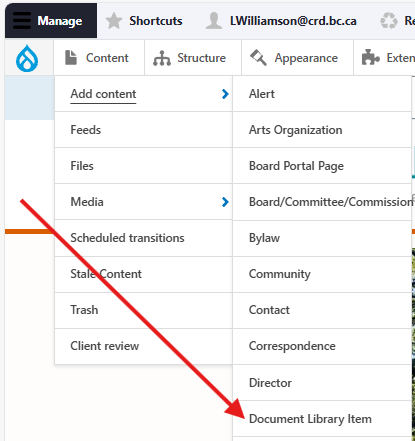
Input the following fields:
- Title: For the name of the document, e.g., "Pedestrian & Cycling Master Plan".
- Description: For providing a short description of the document and its content. This is optional.
Clicking the Document Library Item information tab will display the following additional fields:
- Document category: For selecting the type of document, e.g., a presentation, a report, etc. Note that "Biosolids," "Landfill," and "Water Watch" are sub-categories of the "Reports & Data" category. Users can filter the directory by this input.
- Document topic: For selecting the document's topic. Users can filter the directory by this input.
- Year published: For the publication date of the document itself, not the Drupal node.
- File upload: For uploading the actual PDF file to the node. You may upload more than one. This field is required.
Once you have filled out the above fields, make sure that Published is selected in the dropdown menu, and click Save.
Editing a Document Library Item
- To edit a specific node, click on Content in the Drupal toolbar.
- Filter by the Contact content type.
- Click to edit the specific node. Make your desired edits.
- Make sure that Published is selected in the dropdown menu, and click Save.
Content sharing
Document Library Items can be shared from the main site to the Capital Region Housing Corporation (CRHC) sub-site by checking the Share with the CRHC site field:

When checked, the main Description field and other Document Library Item information field values will be shared. Document files are not duplicated, and all document links on the CRHC sub-site will reference the document URL on the main site.
If a Document Library Item node is shared from the main site, this will automatically check a Shared document from main site field in the management settings of the corresponding sub-site node.
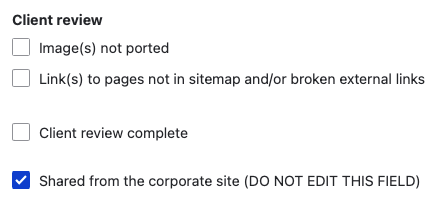
When this field is checked (done automatically by the feed importer), all fields that are part of the sharing feed will be removed and replaced with a warning message (a markup field) communicating that the document library item is shared from another site. This prevents users from updating content on the CRHC's side for any items that are shared from the main site. Do not edit the "shared from the corporate site" field for any reason.

Content lifecycle
There are no scheduled transitions in place for this content type. Content should be reviewed at least once per year to ensure its accuracy.
Editorial guidelines
For instructions on when to use the Document Library Item content type, see the UX style guide.