
Adding a Bylaw
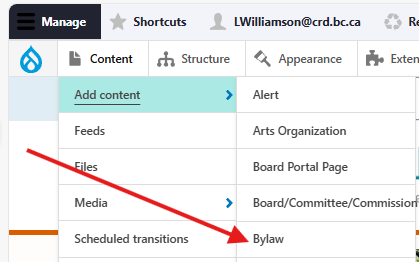
Once logged in, go to the the Drupal Admin toolbar and navigate to Content > Add content > Bylaw.
Image
Input the following fields:
- Title: For the name of the bylaw. This field is required.
- Description: For providing a short summary of the bylaw and its purpose. This is optional.
Clicking the Bylaw information tab will display the following additional fields:
- Bylaw No.: For inputting the specific number of the bylaw.
- Types: For specifying the type of bylaw. Users will be able to filter the bylaw directory by this field. You can select multiple options if applicable.
- Function: For specifying the bylaw's function/topic. This will only be visible on the detail view of an individual node, and not in the main directory.
- File: For uploading a single file to a bylaw node—usually a PDF of the bylaw itself.
- Board/committee/commission: For selecting the related group.
- Community: For choosing the relevant community.
Once you have filled out the above fields, make sure that the checkbox next to Published is selected, and click Save.
Editing a Bylaw
- To edit a specific node, click on Content in the Drupal toolbar.
- Filter by the Business Opportunity content type.
- Click to edit the specific node. Make your desired edits.
- Make sure that Published is selected in the dropdown menu, and click Save.
Content lifecycle
There are no scheduled transitions in place for this content type. Content should be reviewed at least once per year to ensure its accuracy.
Editorial guidelines
For instructions on when to use the Bylaw content type and how to write this type of content, see the UX style guide.